
Editing panels
Flux computes default tooling for the part based on the LTT (Laser Technology Table) that was selected, and the Cut CAM settings for the selected machine. This tooling can then be edited if needed by using various editing panels:
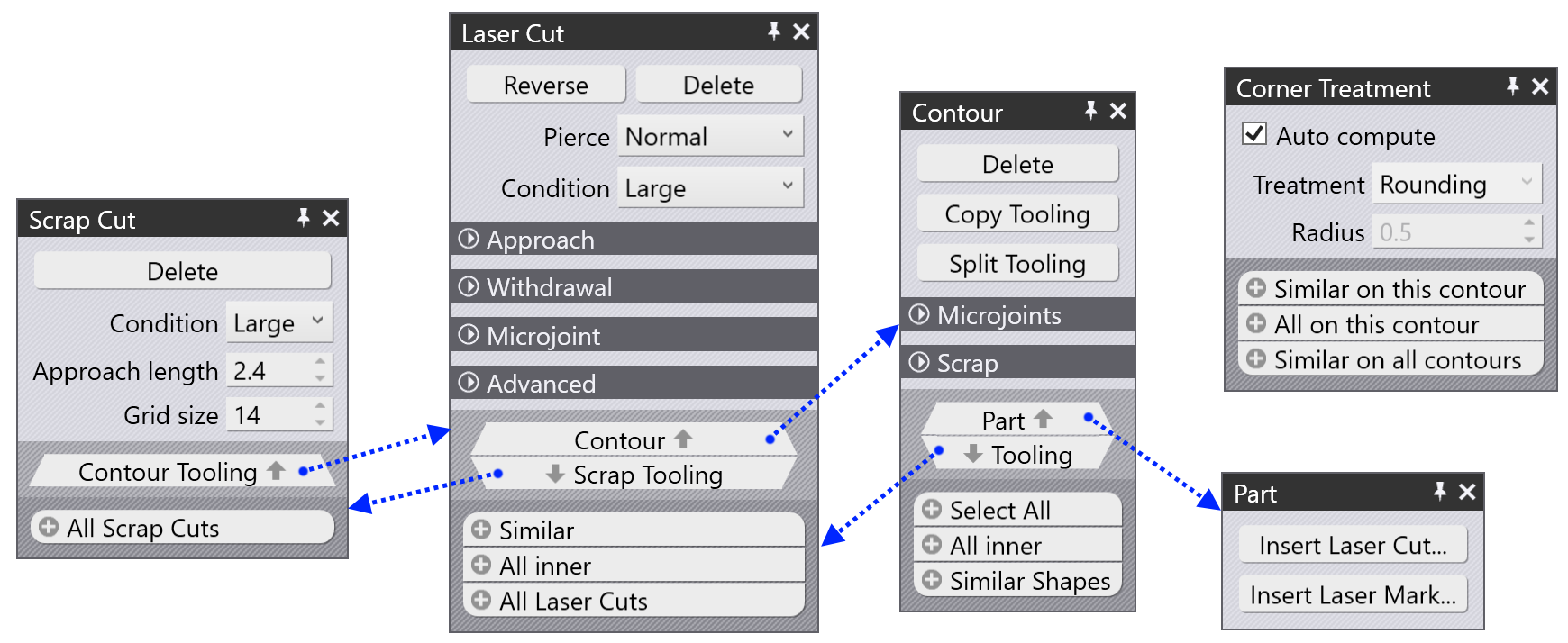
-
The Laser cut panel is the most important panel, and is accessed by clicking on a tooled-up cutting contour.
-
The Contour panel is used to edit all the laser cuts on a particular contour, to add and remove microjoints or to add a scrap cut.
-
The Scrap cut panel is available when a hole has been cut into small scrap pieces, and you can use this to adjust the scrap cutting settings.
-
The Part panel is used to add freehand cuts or text markings on a part.
-
The Corner Treatment panel is accessed by clicking on a corner of a tooled-up contour, and allows you to specify how that corner should be processed.
As the image above shows, many of these panels are interconnected and are reachable from one another by clicking on the up and down navigation buttons, as indicated by the blue arrows.