
Advanced
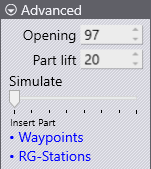
The following parameters appear in the Advanced section of the panel:
-
The Opening setting controls the beam opening [1] after the bending is done.
-
At the start of the extraction, the part is lifted up from the resting position on the die by the Part lift setting before the extraction continues. However, if the Up with Ram setting is turned on, then the part is lifted up along with the beam, and this setting is replaced by the Part lower setting, which controls how much the part is lowered down after the initial stage of travelling up with the beam.
-
The Simulate slider at the bottom of the panel can be used to easily move back and forth through the bending cycle simulation so you can review the effects of your changes. If you make any of changes in the Strategy panel, the simulation is immediately updated, and all collision checks are performed and updated in real time.
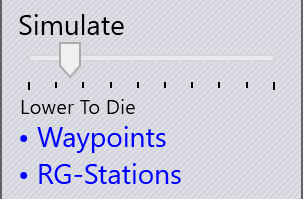
The slider also displays the current phase of the bending operation. In this example, the simulation is at the Lower to Die phase.
-
The Waypoints link takes you to the Waypoints panel where you can have precise control over the robot trajectory during the bending process.
-
The RG-Stations link takes you to the Regrip Stations panel, where you can configure the position of the regrip stations during this bending cycle.