
Part pickup
In general, FlexCell CAM will automatically select the appropriate gripper to pickup the part depending on the part size and the gripper types that are available in the gripper inventory. If multiple grippers can be used for a particular part, the gripper is selected based on the priority set. Verify that the correct gripper intended for the bending operation is selected. If the required gripper is not available or suitable, it can be imported and set up using the following steps:
-
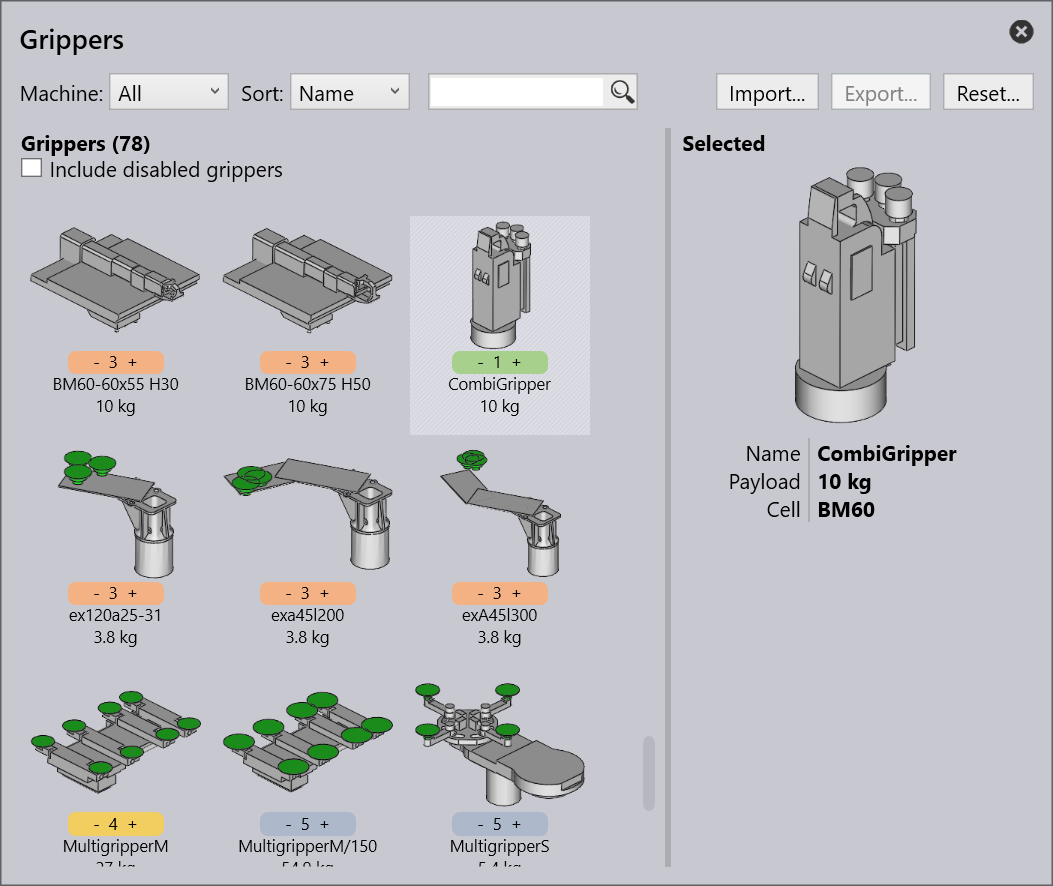
Open the Database in FlexCell CAM and Select Bend Grippers.
-
Choose the required gripper from the inventory.
-
If the desired gripper is not available, click Import and select the appropriate .stl file for the gripper.
-
-
For future convenience, frequently used grippers can be assigned a priority level in the database (1 - Very High Priority).
| Combi gripper (a combination of jaw-type and vacuum suction gripper) is used in FlexCell robot for bending operations. Combi gripper uses Vacuum suction for picking the part from the Pickup pallet to placing it on the Centering table. Once positioned, Jaw-type takes the part from Centering table to perform the bending operation and deposition. |
See Pickup from Pallet and Centering Table setup for more details on configuring the pickup operation.